 TabSash
Put related windows together
Drag a window into a group to give windows from different apps one tab strip.
Bring windows from different apps into one floating tab strip. Switch what you need, keep your layout, and leave the rest of your desktop in peace.
Version 0.1.3 · macOS 14 or later · Apple silicon · 7-day trial

TabSash works with your existing Mac windows. Your apps remain native and independent; the group simply makes them easier to use together.

Drag a window into a group to give windows from different apps one tab strip.
Preview windows with Option–Tab, then use Quick Search to find a window by name.
Snap a group or a single window into flexible screen regions.
Saved groups reconnect as matching windows reopen.
Drag the Group control from one window onto another window’s title bar. TabSash places them at the same size and position, then adds a floating tab strip. You can also drag a window into a group you already made. The apps themselves stay separate.
Click a tab, use a configurable keyboard shortcut, or open Quick Search to find a window by its title, app, or group name. The Option–Tab switcher can show thumbnails, app icons, or a compact title list.
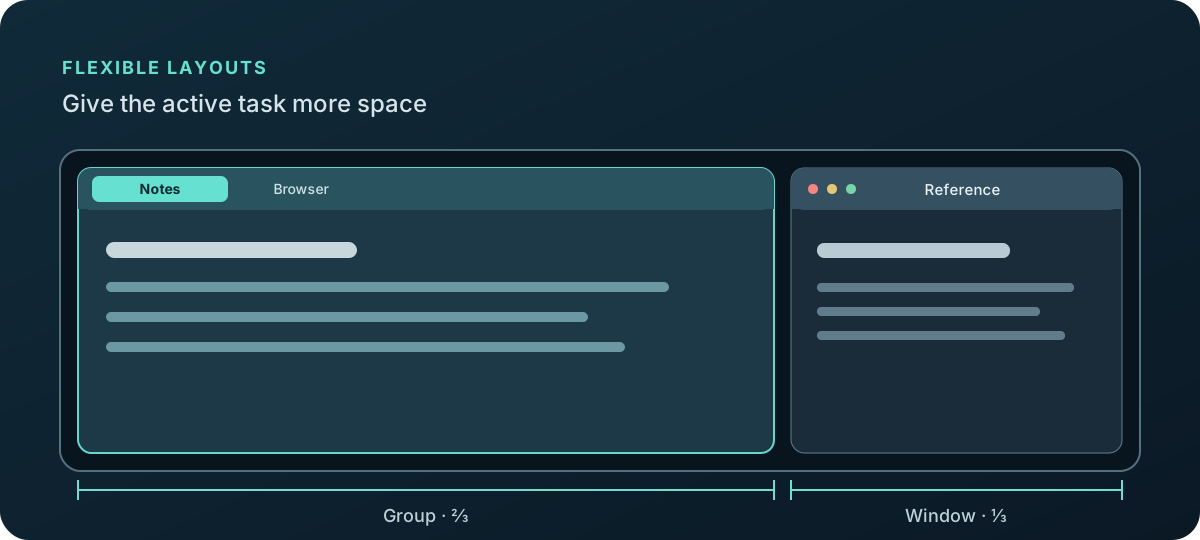
Drag the layout control toward a screen edge to preview and apply a region. Choose proportions from one quarter to three quarters of the usable width, or use corner and vertical regions. Layouts work on a whole group or one independent window.
TabSash saves group membership, selected tabs, and positions. As matching windows reopen, it reconnects them. Optional auto-grouping rules can collect matching apps and window titles into the right group.
A small native utility, with permissions explained up front.
Start with a 7-day full-featured trial. No payment is required to try it, and the trial does not renew automatically. Download version 0.1.3 for Apple silicon and macOS 14 or later.
Open the DMG and drag TabSash into Applications. On first launch, allow Accessibility in System Settings to manage windows. Screen Recording is optional for thumbnails.
Keep the payment page open and save your license key when it appears. Enter it in TabSash’s license settings. License keys are not automatically emailed.
Perpetual use of the purchased version. Future major upgrades may be sold separately. 7-day refund policy.
Lost your key? Email support with your Paddle order reference and purchase email.